The best office headsets under 100 dollars balance clear call controls, comfortable wear, and reliable connections for the way you work. Compare wireless multipoint options with a wired choice to find the right fit for meetings, desk work, and switching between devices.
Quick Top Products
JLab Go Work Pop

- A flip-up boom microphone provides a quick mute gesture.
- Bluetooth multipoint can keep two devices connected.
- The battery is rated for 50+ hours of playtime.
Best For: People who want an on-ear work headset with quick mute and PC-to-phone switching.

JLab JBuds Work Wireless Headset

- The over-ear headset includes a USB-C to 3.5mm cable.
- Bluetooth multipoint connects two devices at once.
- Battery life is rated at 60+ hours.
Best For: Desk workers who prefer an over-ear fit, long battery life, and wired or wireless use.
JLab Go Work Wireless Headset

- Bluetooth multipoint connects two devices simultaneously.
- The package includes a USB-C to 3.5mm cable for wired use.
- The battery is rated for 45+ hours.
Best For: Workers who want Bluetooth multipoint with an included wired fallback.
JLab Studio Wireless On-Ear Headphones

- Bluetooth 5 provides wireless connection to common devices.
- The headphones have 30+ hours of playtime.
- The built-in microphone handles calls and voice commands.
Best For: Budget-conscious workers who need Bluetooth listening and a built-in mic for occasional calls.
JLab Rewind Wireless Retro Headphones
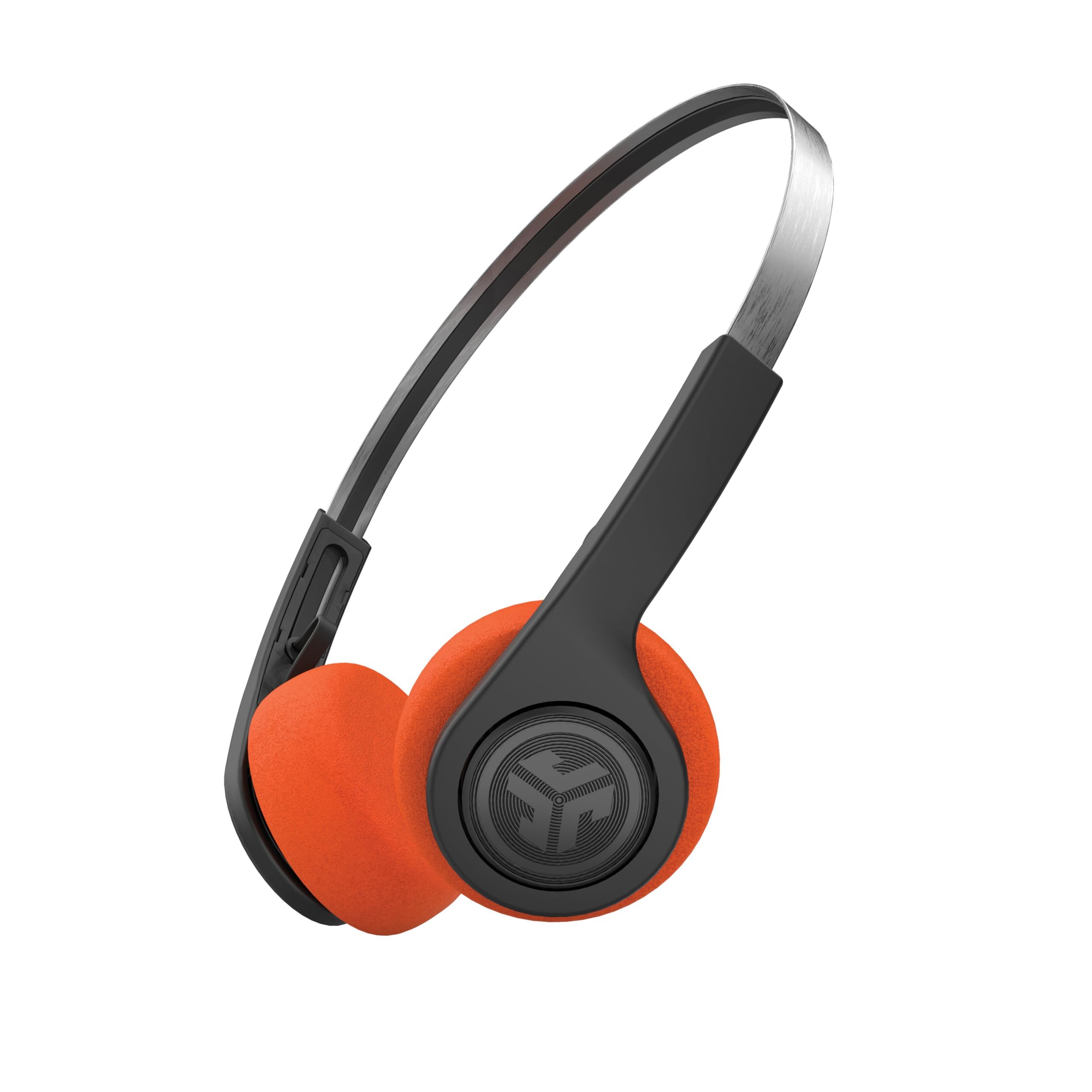
- Bluetooth multipoint supports two connected devices.
- EQ3 modes include Signature, Balanced, and Bass Boost.
- The package includes orange and black foam pad sets.
Best For: Workers who want a lightweight on-ear headset with multipoint and customizable controls.
Best for Frequent Meetings
JLab Go Work Pop, On-Ear Wireless Headset, Bluetooth Multipoint, Noise Canceling Boom Mic, Black
The JLab Go Work Pop pairs a rotating boom microphone with Bluetooth multipoint, so it can stay connected to a computer and phone at the same time. The microphone flips up to mute and rotates out of the way when you are listening.
Voice and Music EQ modes let you switch between calls and other audio, while Cloud Foam earcups cushion the on-ear fit. Its 50+ hours of playtime suits a busy workweek, and USB-C charging keeps recharging simple.
Choose it if wireless flexibility and an easy mute gesture matter more than an over-ear design; the product details do not specify a wired connection.
Best For: People who want an on-ear work headset with quick mute and PC-to-phone switching.
| Pros | Cons |
|---|---|
|
|
Choose the Go Work Pop if you move between a computer and phone and want a physical boom mic with flip-to-mute control. Its on-ear fit and long stated playtime make it a practical wireless desk option.
Check that your computer supports Bluetooth audio, or whether you need a wired backup, since the product details focus on wireless use and do not identify one.
Best for Over-Ear Comfort
JLab JBuds Work Wireless Headset with Microphone, Over Ear Computer Headsets, Wired or Wireless Headphones with 60+ Playtime, Multipoint Bluetooth Headset for Laptop Teams, Office with Mic (16 Pack)
The JLab JBuds Work is the over-ear choice in this group, with Cloud Foam earcups and a boom microphone that rotates for listening or calls. It supports Bluetooth multipoint for two devices and also includes a USB-C to 3.5mm cable for wired use.
The battery is rated for 60+ hours, and a red LED at the end of the boom mic indicates when mute is on. The listing title identifies a 16-pack, so verify the offer configuration before buying for individual use.
This headset is suited to a shared or multi-seat office purchase as much as a single desk setup.
Best For: Desk workers who prefer an over-ear fit, long battery life, and wired or wireless use.
| Pros | Cons |
|---|---|
|
|
Consider this model if you prefer over-ear cushions and want both wireless and wired listening options. Its listed 60+ hour battery life and two-device multipoint are useful for long workdays with a phone and computer.
The 16-pack wording makes offer quantity the main check before ordering; confirm the package count and whether the included cables match your device ports.
Best for Wired Backup
JLab Go Work Wireless Headsets with Microphone, 45+ Playtime PC Bluetooth Headset and Multipoint Connect to Laptop Computer and Mobile, Wired or Wireless Headphones (1 Pack)
The JLab Go Work combines Bluetooth multipoint with a USB-C to 3.5mm cable, giving you wireless use and a wired fallback in one on-ear headset. Its boom microphone uses dual mics for calls and rotates up for listening only.
A red LED at the boom tip indicates mute status, and the controls handle playback, calls, volume, and mute. The battery is rated for 45+ hours, with Cloud Foam earcups for extended wear.
This is a straightforward fit for office users who need to switch between a laptop and phone and value visible mute feedback during meetings.
Best For: Workers who want Bluetooth multipoint with an included wired fallback.
| Pros | Cons |
|---|---|
|
|
Choose the Go Work if you want a wired fallback alongside Bluetooth multipoint and appreciate a red mute indicator. It has less stated battery life than the JBuds Work, but its title identifies a single pack and it includes the wired cable.
Check your computer's port setup before relying on that connection, and consider whether an on-ear headset fits your comfort preference.
Best Simple Budget Pick
JLab, Studio, Wireless On-Ear Headphones, Bluetooth, Foldable, Built-in Mic, Black
The JLab Studio is a simpler wireless option with Bluetooth 5, a built-in microphone, and a foldable on-ear design. Its 30+ hours of playtime can cover extended listening between charges, while three EQ presets offer different sound profiles for music and podcasts.
The product is compatible with iOS, Android, and PC, making it suitable for common personal and work devices. It does not have the dedicated rotating boom mic or explicit mute feedback found on the work-focused headsets here.
Choose it for basic calls and flexible listening when a conferencing-focused mic control system is less important.
Best For: Budget-conscious workers who need Bluetooth listening and a built-in mic for occasional calls.
| Pros | Cons |
|---|---|
|
|
This is a fit for buyers whose office use is mostly listening with occasional calls, rather than frequent meetings that benefit from a dedicated boom mic. Bluetooth 5, the built-in microphone, and foldable design cover basic everyday use.
Before choosing it for a call-heavy role, check whether your conferencing setup provides the mic and mute controls you need.
Best for Lightweight Listening
JLab, Rewind 2, Retro Wireless on-Ear Headphones, Bluetooth multipoint, EQ3, Google Fast Pair, Be Aware, Wireless Sharing, Black
The JLab Rewind 2 is a retro-style on-ear option with Bluetooth multipoint, EQ3 sound modes, and a lightweight adjustable headband. Multipoint can connect two devices, while the JLab App lets you customize EQ, remap touch controls, and adjust Be Aware settings.
Two included foam pad sets allow a choice between orange and black looks. Its built-in microphone and on-ear controls handle calls, volume, and track changes.
The product title and catalog title differ on the model's Bluetooth and playtime details, so confirm the current specification before treating either figure as definitive.
Best For: Workers who want a lightweight on-ear headset with multipoint and customizable controls.
| Pros | Cons |
|---|---|
|
|
Consider the Rewind if you want multipoint and app-adjustable controls in a lightweight retro on-ear design. The included pad sets add a personal styling choice, while its built-in mic and on-ear controls cover basic calls.
The model title and catalog title do not align on version details, so verify the exact product configuration and call controls before relying on it for regular meetings.
How to Choose Office Headsets Under 100
How We Picked Office Headsets Under $100
We prioritized headsets with features that support desk calls: a built-in microphone, clear mute control, comfort details, and practical connections. The JLab Go Work models put a rotating boom mic and multipoint connection at the center, while the JBuds Work adds an over-ear fit and a wired cable.
The Studio and Rewind are lighter on conferencing controls, but offer built-in mics and wireless listening for less formal call routines.
We excluded children’s headphones and gaming-first models because their stated use and controls do not match everyday office calls. We also favored distinct models rather than treating color variants as separate choices.
The JBuds Work offer is identified as a 16-pack, so quantity matters if you are shopping for one headset.
Comparing Office Headsets for Calls and Device Switching
For frequent calls, compare microphone placement and mute handling before focusing on battery life. The Go Work Pop flips its mic up to mute, while the Go Work includes a red LED mute indicator and a cable for wired use.
The JBuds Work also has a red mute light, with an over-ear fit and a stated 60+ hour battery. These controls are useful when you need to mute quickly during a meeting.
Wireless multipoint can simplify switching between a laptop and phone. The Go Work, Go Work Pop, JBuds Work, and Rewind identify connections to two devices.
The Studio offers Bluetooth 5 and broad device compatibility, but its notes do not identify multipoint. If your workplace restricts Bluetooth or requires a wired connection, check the headset and computer ports; the Go Work models include a USB-C to 3.5mm cable.
| Product | Standout features | Best for |
|---|---|---|
| JLab Go Work PopCheck Price |
| People who want an on-ear work headset with quick mute and PC-to-phone switching. |
| JLab JBuds Work Wireless HeadsetCheck Price |
| Desk workers who prefer an over-ear fit, long battery life, and wired or wireless use. |
| JLab Go Work Wireless HeadsetCheck Price |
| Workers who want Bluetooth multipoint with an included wired fallback. |
| JLab Studio Wireless On-Ear HeadphonesCheck Price |
| Budget-conscious workers who need Bluetooth listening and a built-in mic for occasional calls. |
| JLab Rewind Wireless Retro HeadphonesCheck Price |
| Workers who want a lightweight on-ear headset with multipoint and customizable controls. |
Choosing a Comfortable Headset for a Workday
Fit is personal, so decide whether you prefer cushions around the ears or resting on them. The JBuds Work is explicitly over-ear, while the Go Work models and Studio are on-ear.
Cloud Foam appears across the work-focused options, but product records do not provide comparative clamp force or fit measurements. If you wear glasses or keep a headset on for long blocks, consider which earcup style you usually tolerate best.
Battery figures vary across selected wireless headsets, from 30+ hours on the Studio to 60+ hours on the JBuds Work. Treat these as stated playtime figures, and think about your charging routine.
A headset that offers a wired cable can also be useful when you cannot recharge or want to avoid wireless audio during a call.
Who Should Buy Which Office Headset?
Choose the Go Work Pop for flip-to-mute control and two-device Bluetooth switching. Pick the JBuds Work if you prefer over-ear cushions, a longer stated battery life, and wired or wireless use, while confirming that its 16-pack offer is appropriate.
The single-pack Go Work is a strong match for buyers who want a wired fallback and a visible mute indicator.
For basic listening with occasional calls, the Studio has a built-in microphone, foldable design, and Bluetooth 5. The Rewind adds multipoint and app customization, but verify the model version and call controls before buying.
Match the microphone and connection style to the meetings you take, then consider battery and fit.